Lipsync in DaVinci Resolve Studio
Lip sync without leaving your timeline. The sync. labs plugin for DaVinci Resolve Studio lets you pick clips from the media pool, run any sync. labs lip sync model, and drop the result straight back into your edit.
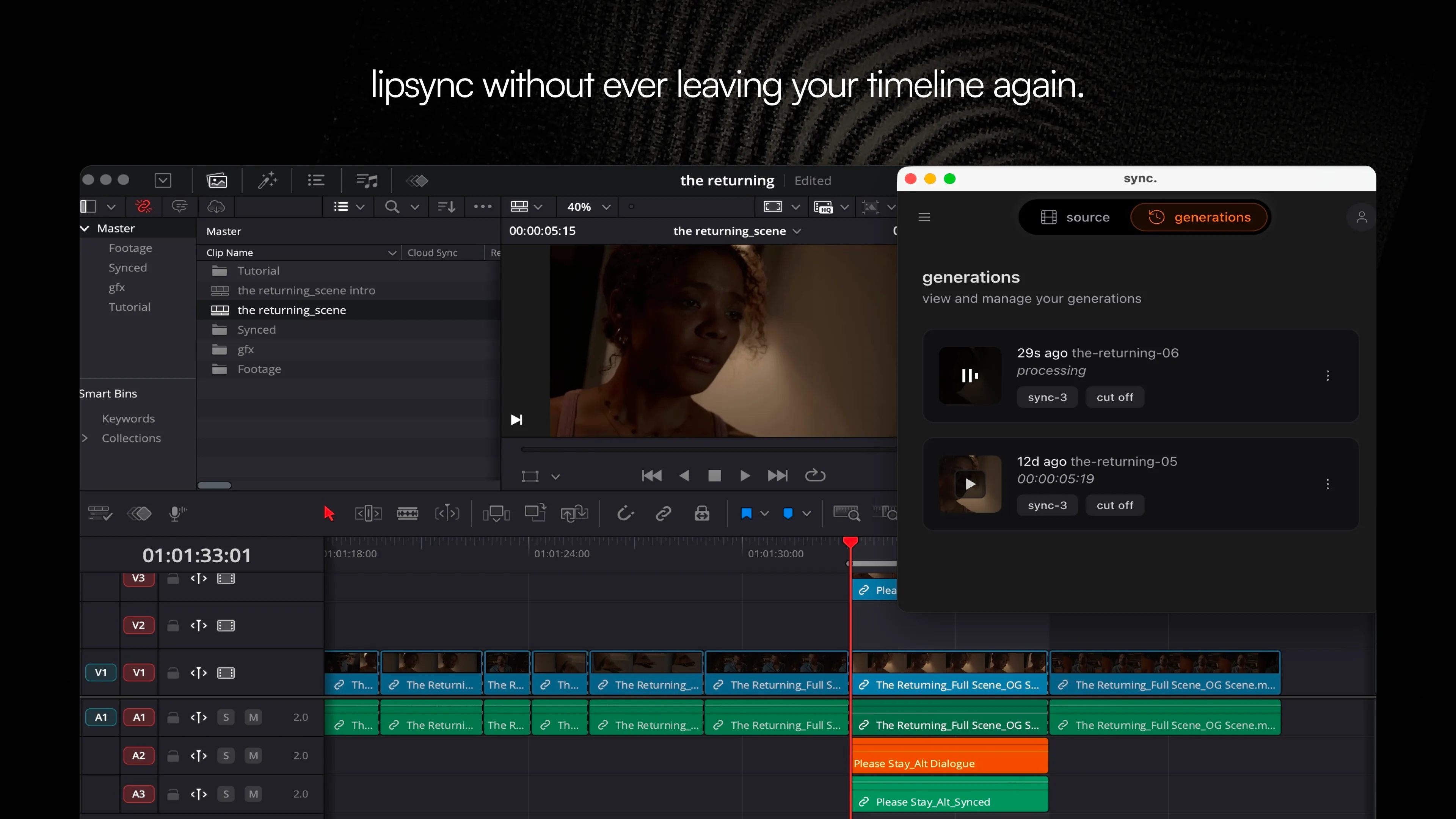
The sync. labs plugin for DaVinci Resolve Studio brings AI lip sync into the timeline you already cut in, with no export and no round trip to a browser. You select the clip, generate, and the synced version lands back in your edit. It’s the same plugin loop we built for Premiere Pro, now native to Resolve Studio.
A lot of professional color and finishing work lives in Resolve Studio, so exporting a clip, fixing a line of dialogue or a dub in a separate web app, and re-importing it pulls you out of the edit every time. The plugin keeps that work where it belongs.
The plugin runs lip sync inside DaVinci Resolve Studio
The plugin lives in your Resolve Studio workspace and works the way the rest of the app does. Pick a clip from the media pool, or set in and out points on a sequence to sync just the range you care about. You can also upload a file straight into the plugin. Hit generate, preview the result in place, and drop it back into your timeline when it looks right.
That’s the whole workflow:
- Select in and out points on your timeline, or pick a clip from the media pool
- Generate the lip sync without leaving Resolve Studio
- Preview, then drop the result back into your edit
It runs in DaVinci Resolve Studio, the paid version of the app.
The plugin runs every sync. labs lip sync model
The plugin gives you the full lineup of sync. labs lip sync models inside Resolve Studio, so you can pick the one that fits the shot. We recommend sync-3, our most advanced model. sync-3 reads the whole scene instead of a square cropped around the mouth, so it holds up on the shots that actually show up in a finishing session: sharp angles, low light, multiple speakers in frame, and close-ups at up to 4K 60fps. The performance in the original take carries through instead of getting flattened.
The result is a lip sync your eye stops noticing, dropped back into the timeline at the quality your finish demands.
Get the plugin
The DaVinci Resolve Studio plugin is available now, download it free here. Install it and run your first sync from inside Resolve Studio.
We build sync. labs to make great video less dependent on a perfect take. Putting lip sync inside the tools editors already live in is a big part of that.