Clearer workflows, better dubbing, and a smoother Studio
WorkflowsDubbingStudio
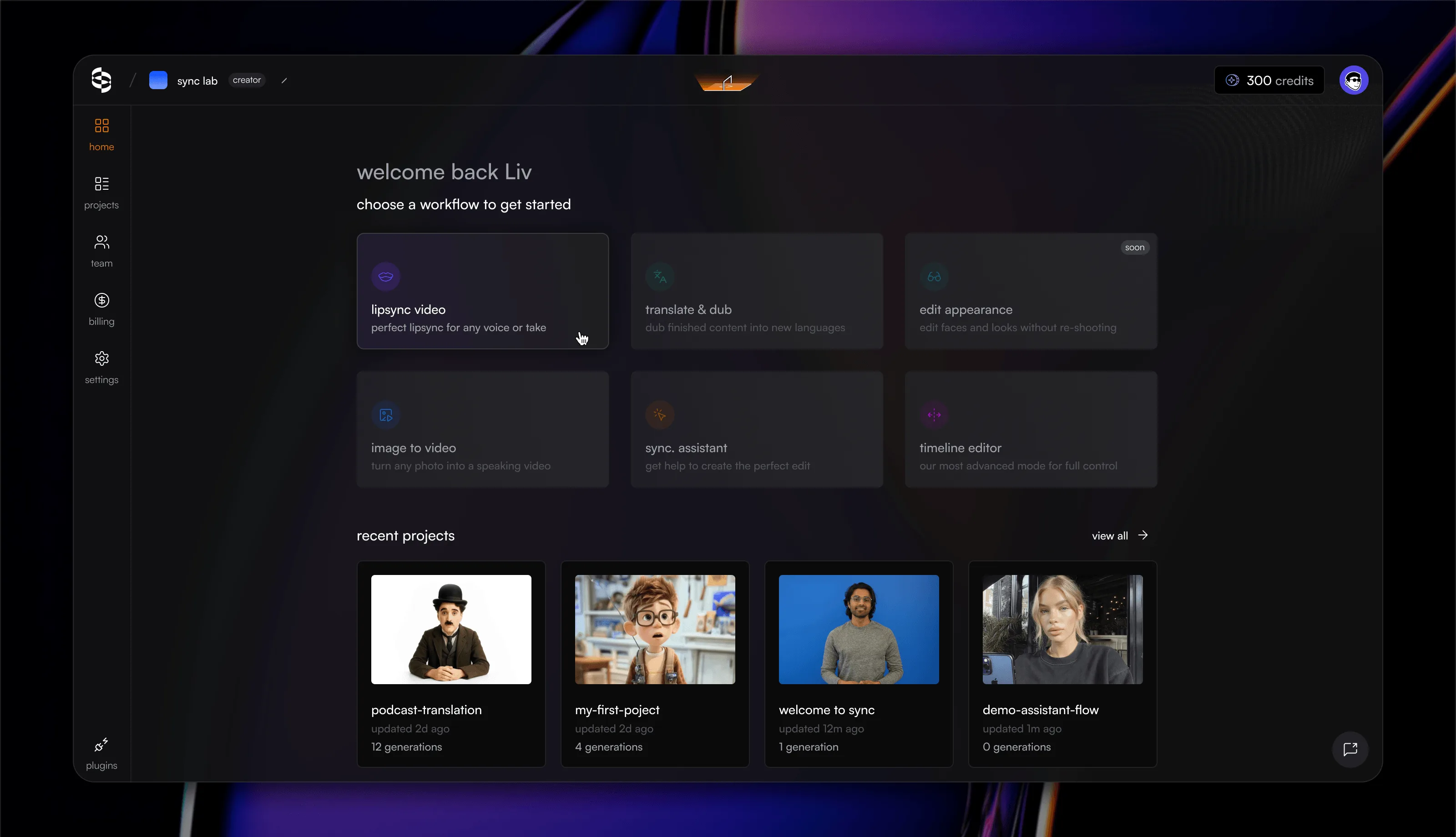
- Start from the outcome you want - The workflow dashboard is now available to everyone. Choose lip sync, translate and dub, image to video, sync. assistant, or the timeline editor, and sync. labs opens the right tools for the job. Projects created in Adobe Premiere Pro and DaVinci Resolve now open in the same guided lip sync workflow when viewed in the App.
- Built-in dubbing now supports 92 languages - Create translated dubs across the App, API, Adobe Premiere Pro, and DaVinci Resolve. The upgraded dubbing engine automatically detects speakers and returns lossless audio for the final dub. Read the dubbing guide
- Studio remembers your model choices - New drafts use the latest compatible model from your project. When you choose a model explicitly, Studio uses it as the starting point for future projects.
Improvements
- Project cards now show when a lipsync is in progress and surface newly added draft media ahead of older results.
- Workflow guidance stays visible as soon as you submit instead of briefly flashing the edit state.
- Asset hover previews now include seek thumbnails, making it easier to scan longer videos.
- Downloading every result in a project is more reliable, with automatic retries and resumable downloads for interrupted transfers.
- Download actions now live in one consistent menu for the current result, every ready result, and watermark-free upgrades.
- Credit activity, plan limits, and auto top-up settings are clearer and easier to manage from billing.
- Duration limits for longer media are now shown in hours, minutes, and seconds.
- Video playback now recovers when a new source is loaded after an error and gives clearer retry guidance.
- Failed generations now show an actionable error with the relevant billing, integration, documentation, or support next step.
- Model and speaker recommendations appear in sequence instead of competing for attention.
- The space bar now controls play and pause across Studio without requiring a click on the player first.
- Studio Lite and shared players now show the current timestamp and total duration.
Bug fixes
- Fixed audio and video recording stopping immediately after it started.
- Fixed generation thumbnails getting stuck in a loading state in Studio and the projects view.
- Fixed workflow results not scrolling correctly on mobile and the video player shrinking to an unusable size.
- Fixed completed uploads remaining in the uploads widget after navigating between projects.
- Fixed dubbing controls becoming unusable when the selected source was muted or silent.
- Fixed browser back and forward navigation leaving Studio on a stale project.
- Fixed model recommendations overriding selected models and generation settings.
- Removed a duplicate download button from the advanced Studio controls.
- Fixed multi-file video and audio drops on the timeline being rejected with an incorrect file-format error.
- Fixed multi-segment timeline generations failing at segment boundaries.
- Fixed the asset picker opening empty and Clear filters leaving active asset filters behind.
- Fixed invited teammates being sent through signup onboarding instead of landing in the team they joined.
- Fixed returning paid users with existing work getting trapped in the signup onboarding loop.
- Fixed usage pages losing every total when one usage source was temporarily unavailable.
- Fixed the Studio assets panel showing assets from other projects when opened from the current project.
- Fixed video analysis enabling occlusion handling without approval.
- Fixed dubbing jobs transiently failing while their finished lossless audio was still becoming available.
- Fixed overlapping controls appearing when starting a new generation immediately after adding audio.