Create, translate, and review videos in ChatGPT
ChatGPTDubbingStudioAPI
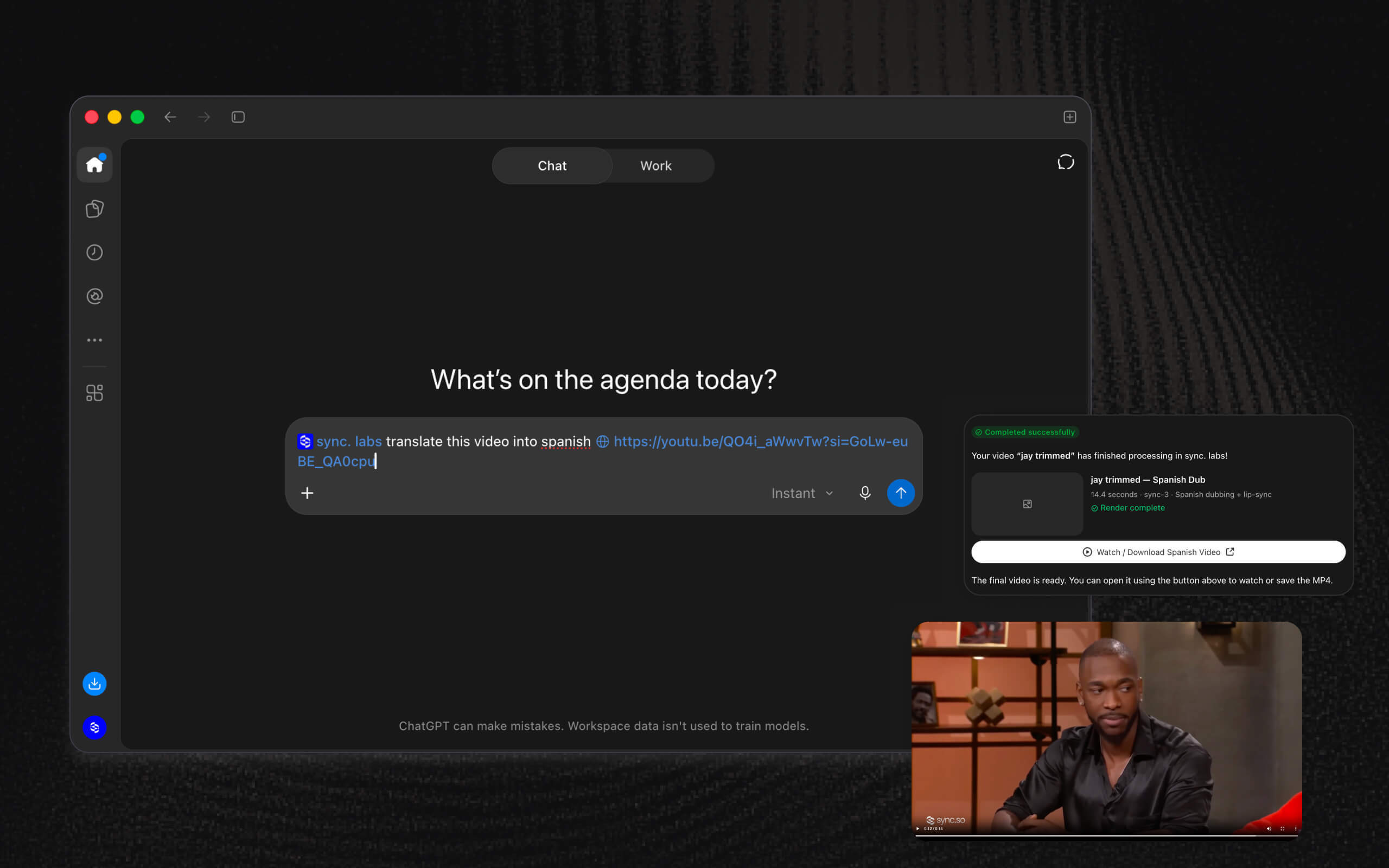
- An interactive editor inside ChatGPT - Browse your sync. labs projects, upload or select media, choose a model, and create videos without leaving the conversation. Review the result in the player and compare it with the original input.
- Translate and dub videos in ChatGPT - Choose Translate & Dub, select your video, and search for the source and target languages. Review the dubbed result, download it, or reuse the video for another language.
- See the estimated cost before generating - ChatGPT now shows the expected cost in credits or dollars before you submit. Translate & Dub estimates include both dubbing and lip sync, with any external-provider charges shown separately as excluded from the estimate.
- More natural dialogue edits - Edit Dialogue uses the surrounding sentence to shape replacement speech and fills gaps with room tone matched to the source when suitable audio is available. Replacement words also land closer to their original timing.
- Leave selected footage untouched while dubbing - In Advanced Studio, mark clips or timeline ranges as No lipsync to keep their original video while translated audio continues. Turn lip sync back on for a range whenever you need it.
- Choose regional dubbing dialects - Studio now offers regional language choices, including Spanish for Argentina, Chile, Spain, and Mexico. The timeline uses the same searchable language picker as the other dubbing flows.
Improvements
- Return to recently visited projects and Home with their existing content visible while data refreshes. Studio keeps timeline thumbnails and waveforms when you return to the same project.
- Choose a desktop Studio model with the arrow keys and adjust its settings with the keyboard.
- Billing keeps the previous rows and totals visible, marked as loading, while you change periods or filters.
- Removing a team member now revokes their API keys in that team. The confirmation explains which integrations may stop working.
- Add a pronunciation hint in Edit Dialogue to guide how a replacement word should sound.
- Edit Dialogue warns while you type when replacement wording may be too long to fit, and explains when a preview exceeds the 100-edit limit.
- Videos without an audio track now open the voiceover flow from Edit Dialogue. Videos with no detected speech offer an explicit Add a voiceover action.
- Edit Dialogue now uses sync-3 for lip sync, including drafts reopened from older-model results.
- Dubbing estimates now appear beside the translation controls in Studio Lite, Advanced Studio, and Assistant, with lip sync priced separately.
- Studio resizes oversized JPEG and PNG photo uploads to fit image-to-video limits while preserving orientation and aspect ratio.
- Uploading an identical file again can now reuse your existing saved asset instead of transferring the bytes a second time.
- Scale plan API users can submit batch rows directly as JSON, without preparing a JSONL file.
- Voice cloning now waits and retries when shared cloning capacity is temporarily busy. You can stop waiting without losing your name or samples.
- Asset source selection now supports arrow-key navigation, and preview volume controls stay visible when reached with the keyboard.
- Studio history now includes work from connected clients such as ChatGPT, Claude, Gemini, and MCP, along with API-key generations in their owner’s private project. The API can also return generation history for a selected project.
- Team members can rename and revoke their own API keys, and give new keys an optional name during creation.
- When Safari or another browser cannot decode audio for a partial sync, Studio offers Replace audio while keeping your video, settings, and speaker selection.
- Completed Studio results now offer Download original when the browser cannot play their video format.
- Mark in shows its applied marker immediately above the timeline playhead, without waiting for hover.
- Duration-limit messages now explain when a rounded display hides the extra time that put a file over the limit.
- Studio side panels open and close with smoother transitions.
Bug fixes
- Studio timelines can now render clips that mix audio sample rates or mono and stereo tracks.
- Voice samples extracted from high-bitrate video are compressed to fit the cloning service’s size limit.
- Fixed uploads failing when another team member opens a shared plugin project.
- Studio media pauses when you leave the page and stays paused when you return. Returning from Home also keeps recorded takes and voice samples available.
- Studio repairs overlapping audio clips when they can be separated without losing audio. If the repair would push audio past the video, Studio keeps the layout and explains what to fix.
- Fixed later clips losing their audio when No lipsync preparation removes gaps between video clips.
- Studio can submit generations when browser storage or Web Locks are unavailable. A notice explains when recovery will not survive a reload.
- Audio recordings that reach their time limit are now kept and applied instead of disappearing.
- Temporary errors on shared-result links now offer Try again instead of Content Not Found.
- While editing a draft from a completed lip sync result, the Studio header Download button downloads that result.
- Failed API-key revocations and integration removals now keep their confirmation open so you can retry or cancel.
- Reloaded H.264 MOV inputs can start native playback without waiting for the server to identify their codec, when the browser supports the stream.
- Fixed duplicate generation failure notifications. The selected failed result now shows one detailed error with its recovery action.
- Fixed voice names being accepted in Studio and rejected after sample upload. Invalid names now show an inline error before uploading, with your name and samples retained for correction.
- Fixed translated audio from a previous video remaining selected after changing the source video.
- Fixed deleted frames briefly reappearing at timeline trim boundaries.
- Connecting an already connected integration now returns 409 Conflict and preserves the existing key. Disconnecting an integration that is not connected returns 404 Not Found.
- Rejected OAuth refresh tokens now return invalid_grant so clients can recognize when fresh authorization is required.