Image-to-video, DaVinci Resolve, and the full creation stack
Image-to-videoDaVinci ResolveTimelineAPIChatGPT
- Image-to-video with sync-3 - Turn a still image into a naturally speaking video. Upload a JPEG, PNG, or WebP image, add audio, choose the face you want to animate, and let sync-3 build the performance. Available in the App, API, Adobe Premiere Pro, and DaVinci Resolve.
- DaVinci Resolve plugin - Bring sync. labs into DaVinci Resolve. Use footage from your timeline or media pool, generate a result, and send it straight back to your project. Download the plugin
- More control on the Timeline - Crop individual clips, undo and redo edits, trim with frame-level precision, and keep full-resolution output through the edit. The preview now matches the final render more closely, so you can make decisions before spending a generation.
- The full creation stack, now in the API - Upload and reuse assets, synthesize speech, clone and manage voices, organize work into projects, generate lipsync, and wait for results in one request. Explore the API
- Create directly in ChatGPT - Upload a video or image, create speech, clone a voice, animate an image, generate lipsync, organize projects, and retrieve results without leaving the chat. Use sync. labs in ChatGPT
Improvements
- Download every completed generation in a project as one ZIP, including work created across the App and API.
- Preview an asset by hovering over it and pressing Space.
- The App now warns before generation when multiple speakers are detected and no speaker has been selected.
- Closed-lip footage now prompts you to use sync-3, which handles that starting position more naturally.
- Compare original and dubbed audio inside the dubbing preview before generating the final video.
- The App reads professional media metadata more reliably for MOV, ProRes, MXF, and DNxHD files.
- Adobe Premiere Pro and DaVinci Resolve can submit another generation while earlier uploads continue in the background.
- Generation errors now distinguish invalid requests, duplicate submissions, timeouts, unavailable services, and concurrency limits, with clearer guidance on what to do next.
Bug fixes
- Fixed sync-3 rejecting some videos that were within the duration limit after sync mode was applied.
- Fixed generated text-to-speech audio not appearing in the preview.
- Fixed the App occasionally staying on the Source view after a generation finished.
- Fixed the Timeline going empty while a generation was processing.
- Fixed audio clips being placed beyond the end of the video track.
- Fixed intermittent Adobe Premiere Pro plugin failures during project scanning, uploads, and authentication.
Dubbing, Assistant mode, MCP server, and sync-3
DubbingAssistantMCPSync-3Plugin
- Dubbing - Translate any video into another language and lipsync it in one step. Pick a target language and sync. handles translation, voice cloning, and lipsync - 29 languages supported. Available in Studio and via API. Try it in Studio · Use the API
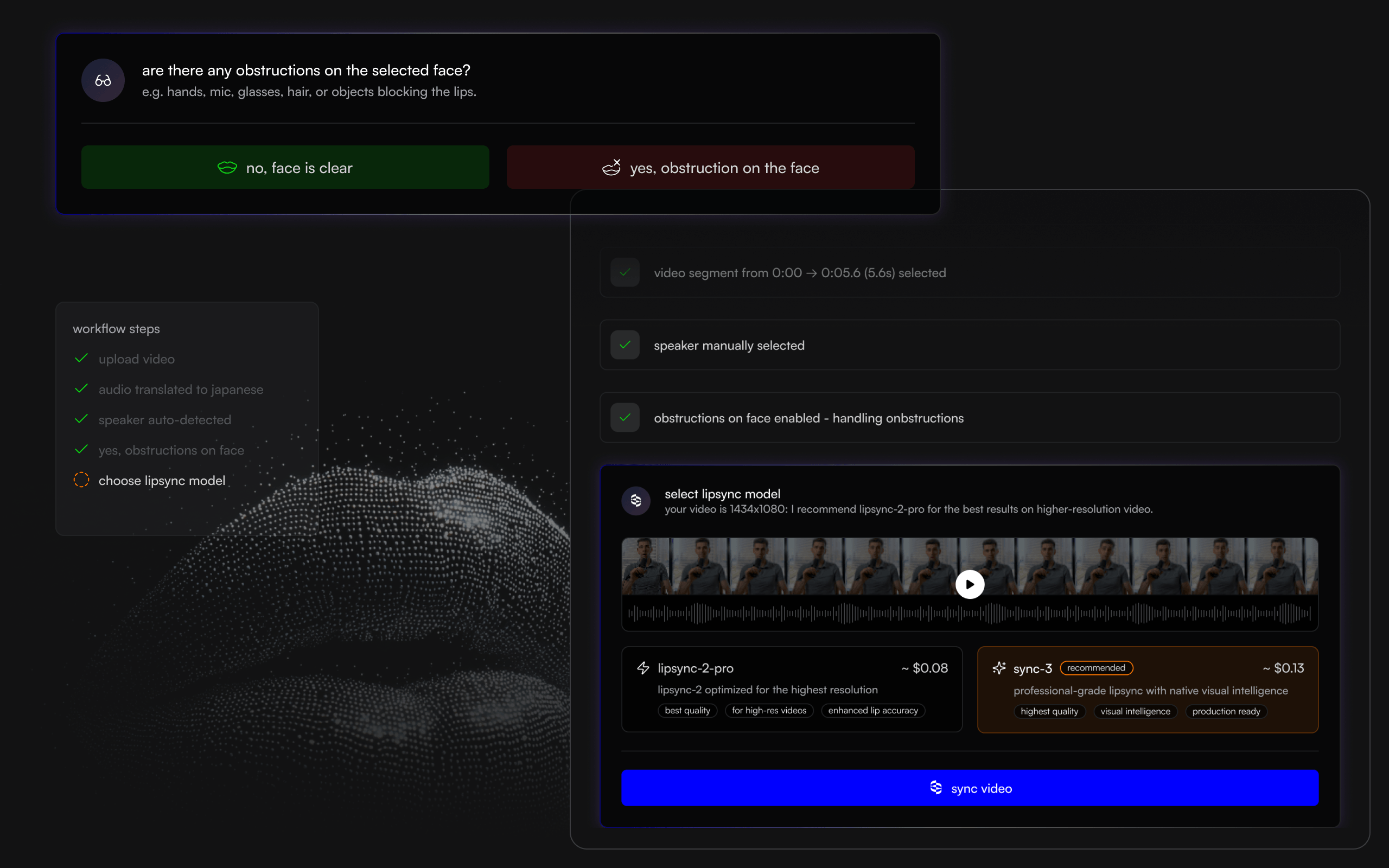
- Assistant mode - A whole new way to lipsync your videos. Drop a video, describe what you want, and sync. handles the rest. No settings to configure, no modes to pick. The assistant recommends the right model, detects speakers, and generates your sync automatically.
- MCP server - Generate lipsynced videos, manage assets, and track renders directly from your code editor or AI assistant. Works with Claude, ChatGPT, Cursor, Windsurf, Codex, and any MCP-compatible client. Get started here.
- sync-3 - Our newest model is now available to all users, including free tier. sync-3 delivers the highest quality lipsync we’ve ever shipped.
Improvements
- Simplified model picker - fewer choices, clearer recommendations.
- Faster speaker detection on uploaded videos.
- App remembers your last visited page (Studio or Assistant) across sessions.
- Plugin now available to all users - no more feature flag gating.
- Headless audio extraction in the Premiere Pro plugin - no more Media Encoder UI popup.
- Audio input is now preserved when replacing video in Lite mode.
- Sync mode selector tooltip now shows the currently selected mode on hover.
- Studio loads faster across the app.
- Unified API-first architecture - Studio, the plugin, and the public API now run on the same foundation, so what ships in one ships everywhere.
Bug fixes
- Fixed speaker selection popover being unclickable and dismissing inconsistently.
- Fixed multi-face prompt reappearing after being dismissed.
- Fixed webcam recording starting with a black frame instead of a live preview.
- Fixed .qt video uploads behaving inconsistently in Studio.
- Fixed downloads forcing .mp4/.mp3 filenames instead of preserving the original extension.
- Fixed share page video player missing its thumbnail poster.
- Fixed audio assets opening in a new tab instead of downloading.
- Fixed billing tab not showing all requests on longer billing periods.
- Fixed video URL submission firing before the upload finished.
- Fixed react-1 API usage not appearing in the billing dashboard.
- Fixed “Add member to team” failing.
Premiere Pro plugin, sync mode selector, and API-first architecture
PluginPremiere ProAPISync ModeCSV Export
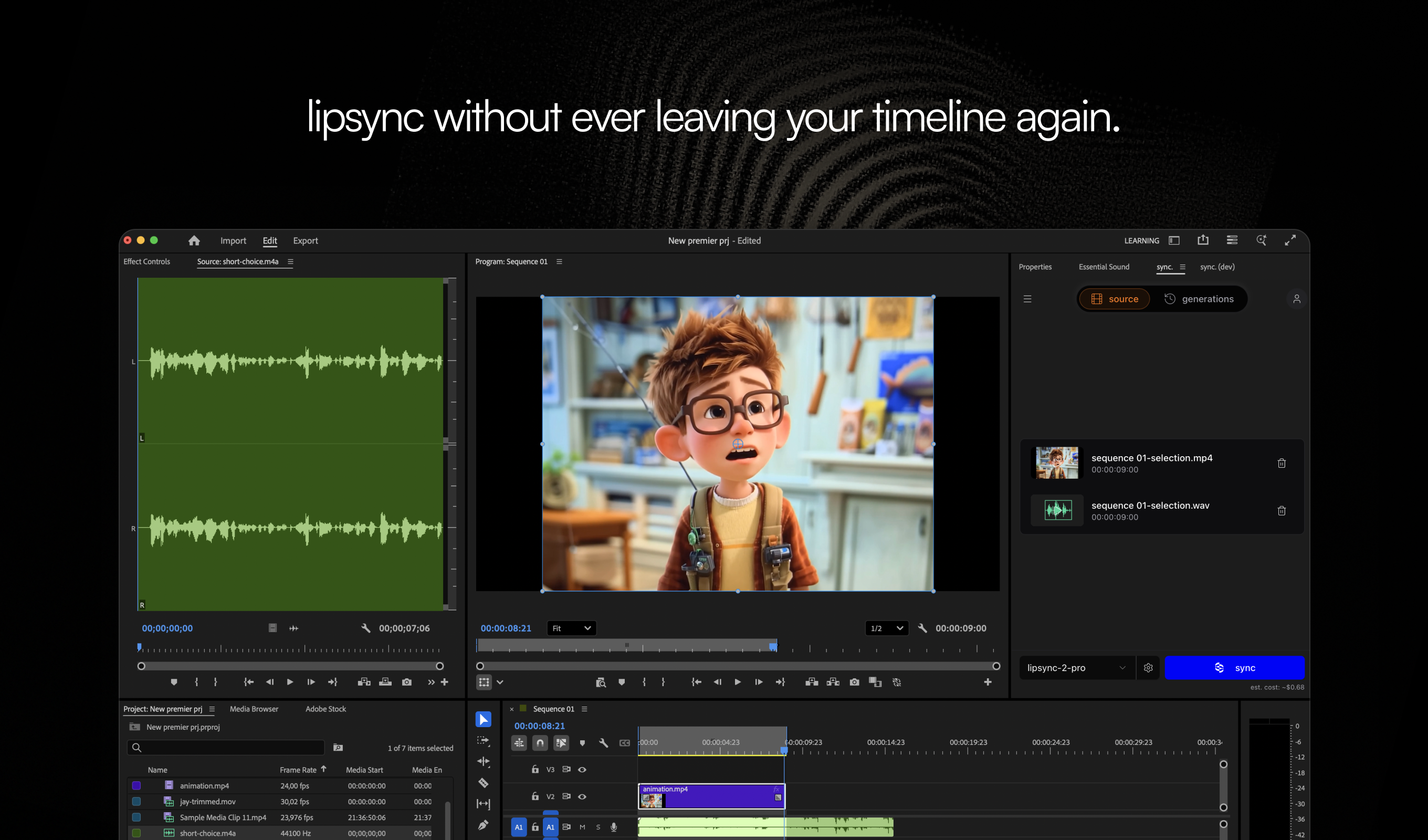
- Adobe Premiere Pro plugin - Lipsync without leaving your timeline. Select in/out points on your sequence, pick clips from the media browser, or upload directly into the plugin. Generate, preview, and drop the result back into your edit. Built for the way editors actually work. Learn more
- Sync mode selector - When your audio and video have different durations, you can now choose how the model handles the mismatch.
bounceloops the shorter media back and forth,cut_offtrims the excess,silencepads the gap, andremapstretches to fit. Learn how each mode works - API-first architecture - Revamped our backend to be API-first - the same endpoints that power Studio are now available to you. First up: the Assets API lets you list, search, and filter your media library programmatically. You can also pass an
assetIddirectly to the generation endpoint instead of a URL. More endpoints coming soon. - CSV usage export - Download your detailed spending breakdown for any date range from Usage for reporting or feed it into other tools.
- lipsync.com - A central resource for everything lipsync - guides, use cases, comparisons, and tools in one place. Check it out
Improvements
- Select multiple assets in a project and delete them in bulk.
- Studio loads faster - preloaded video thumbnails and deferred heavy assets for quicker initial page load.
- Faster API responses - improved authentication speed and optimized generation queries.
- Face selection is now always visible after video upload - when multiple speakers are detected, you’re prompted to pick the active face directly on the video.
- Copy Voice ID button in the TTS voice selector for easier API integration with cloned voices.
- Delete your account directly from Settings - no support ticket needed.
Bug fixes
- Fixed billing and usage filters not applying correctly for certain date ranges and plan types.
- Fixed Studio freezing during video upload causing page unresponsive errors.
- Fixed videos showing black screen as first frame in project view.
- Fixed usage dropdown not filtering correctly.
new model: react-1, audio tags for TTS, generations renames, Microsoft SSO, and more
react-1TTSAuthenticationGenerations
- react-1 - A new model that lets you control performances in post-production. Upload your footage (filmed or AI-generated), then adjust the acting without reshoots. Select head, face, or lips and fine-tune delivery using the emotion wheel. Learn more about react models.
- Audio tags in TTS - Add tags in square brackets like
[excited]or[whisper]when generating text-to-speech to control emotion and delivery. Using at least one tag enables ElevenLabs v3 for more expressive speech. - Rename generations - Give your results meaningful names so they’re easier to find after downloading. Click “…” on any history thumbnail and select “Rename”. Defaults to project name + generation number.
- Microsoft SSO - You can now sign in with your Microsoft account.
Improvements
- Upload panel now auto-hides when all uploads complete instead of retaining previous state.
- Smart suggestions now appear when generation results aren’t great, with actionable steps to improve them.
- Simplified model picker with settings moved to a separate dropdown in the same location.
- Cloned voices now work over API. Copy Voice ID directly from the voices dropdown in Studio.
Bug fixes
- Fixed assets filter clear button not working.
Speaker selection, reasoning mode, and resumable uploads
Speaker SelectionUploadsAssets
- Speaker Selection - Manually select speakers directly from your video for targeted lipsync edits. When 2+ speakers are detected on the same frame, the selection button appears automatically. No more guessing who’s speaking - just click, sync, and go.
- Reasoning mode for lipsync-2-pro - New toggle automatically detects and fixes artifacts, occlusions, and extreme poses for cleaner, more stable results. Takes a bit longer to process, but the quality boost is worth it.
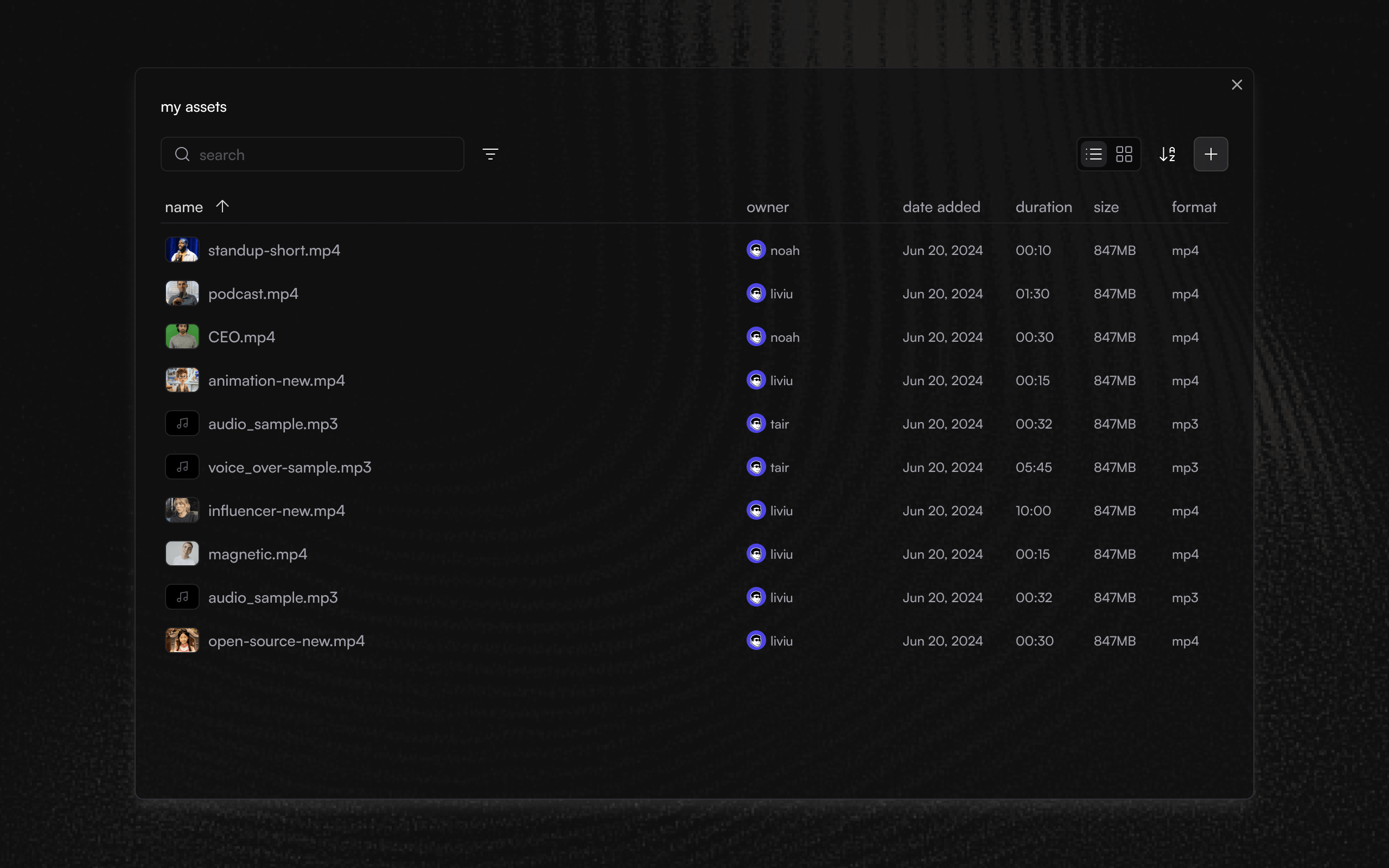
- Redesigned assets view - New table layout with sortable columns, thumbnails, and rich metadata. Right-click any asset for quick actions, see who created what in team projects, and find files faster with improved organization.
- Resumable & cancellable uploads - New upload system handles everything from tiny files to multi-GB projects. Pause, resume, or cancel anytime-uploads survive page refreshes, browser restarts, and flaky network conditions. The new upload widget shows accurate progress, speed, and ETA, with navigation guards to prevent accidental data loss.
Improvements
- New upload widget for controlling and monitoring all uploads in one place.
- Uploads now auto-recover from offline states and network transitions.
- Improved pricing clarity for Teams with better billing period explanations.
- New segments icon in timeline mode for better visual clarity.
- Face detection now uses best-in-class model for faster, more accurate speaker detection.
- New Experimental Features toggle in settings to enable all beta features at once.
- Emotion selection is now shown in generation history for past projects.
- Face detection overlays now hide during video playback for cleaner viewing.
Bug fixes
- Fixed generation deletion not working properly.
- Resolved audio-video detaching errors where videos were incorrectly treated as silent.
- Fixed an issue where projects were incorrectly loaded when switching teams.
- Fixed voice clone selector not showing the correct selected voice.
- Fixed extra bottom padding on mobile that was happening in some scenarios.
- Fixed Studio Pro left panel re-rendering issues for smoother performance.
Major performance upgrades and faster assets delivery
PerformanceStudioInfrastructure
- Blazing fast performance - Completely rebuilt Studio state architecture delivers smoother interactions, faster loading, and a more responsive experience across all features.
- Instant generation delivery - Results and assets now served at the edge for quicker access to your creations.
- Enhanced voice cloning - Updated ElevenLabs integration with latest API requirements for more reliable voice cloning.
- Optimized uploads - Client-side media compression automatically reduces file sizes for faster upload times.
Improvements
- Improved tooltip visibility in model preferences for better clarity
- Easier asset discovery in Lite mode with improved UI
- Better error handling across the app
Bug fixes
- Fixed crash when selecting models in billing usage view
- Resolved issue preventing typing in TTS box in Advanced mode
- Fixed current frame counter showing larger than total frames in player
- Sync modes in Advanced mode now persist when moving audio in timeline
- Fixed scrubbing functionality in preview mode
- Generation thumbnails now correctly show output instead of source video
- Share buttons now work as expected
- Improved error messages for audio duration issues
- Resolved video upload errors
- Fixed bad inputs with zero-length segments from Studio
Full mobile experience and more
MobileAssetsUX
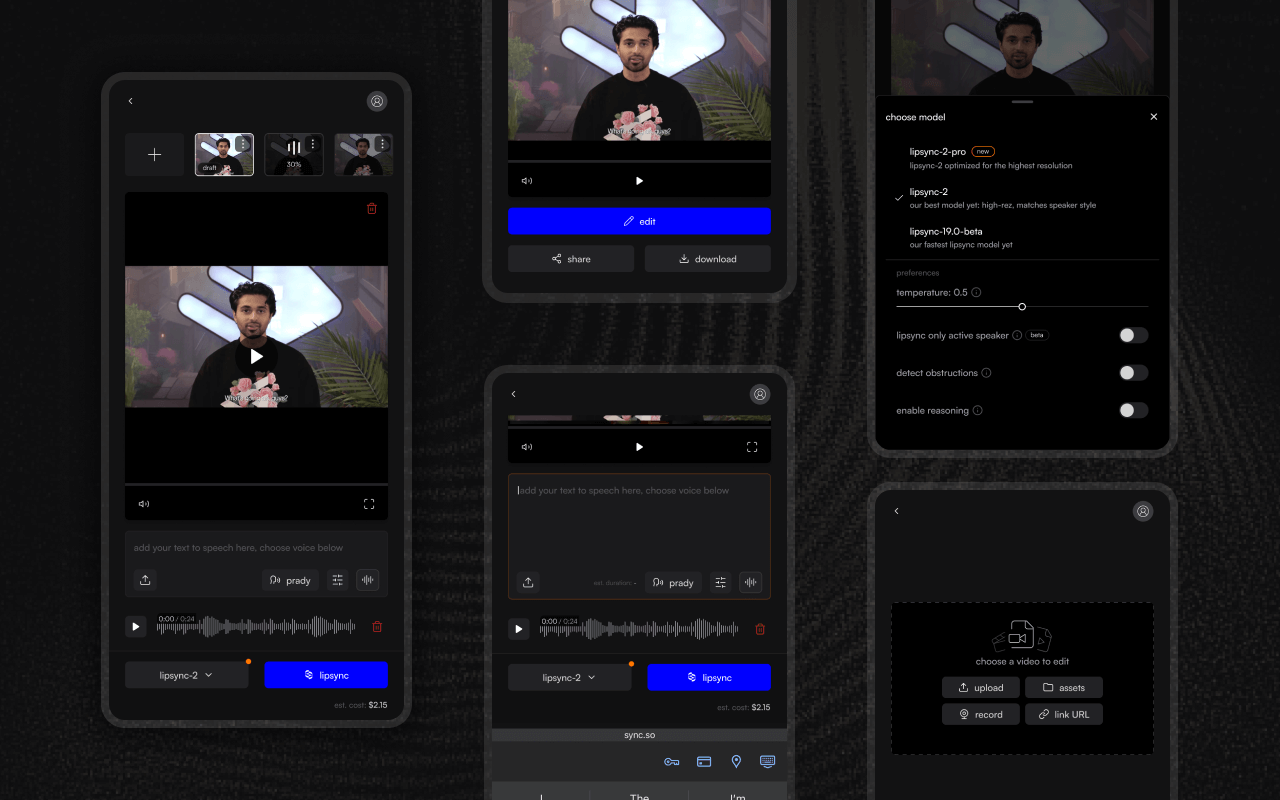
- Full mobile experience - Everything you can do in Lite mode on desktop is now available on mobile, bringing the complete Studio experience to your phone.
- Settings that persist - Your generation settings now carry over to new projects and drafts, saving time on every creation.
- Rate generations to improve the models - Provide feedback on your generations to help us enhance our lipsyncing models for everyone.
Improvements
- New drafts automatically inherit settings from your last generation
- Smoother visual feedback when detaching audio from videos
- Enhanced asset management with improved sorting and filtering
- Model notification indicator now dismisses automatically after first interaction
Bug fixes
- Projects now correctly sort by most recently used
- Asset filters dropdown opens reliably on all clicks
- Voice clones with identical names no longer cause selection issues
- Billing links now redirect to the correct subscription page
- Cost estimates now accurately reflect your selected sync mode
- Various UI refinements for a smoother experience
Studio Lite redesign with mobile support
StudioModelMobile
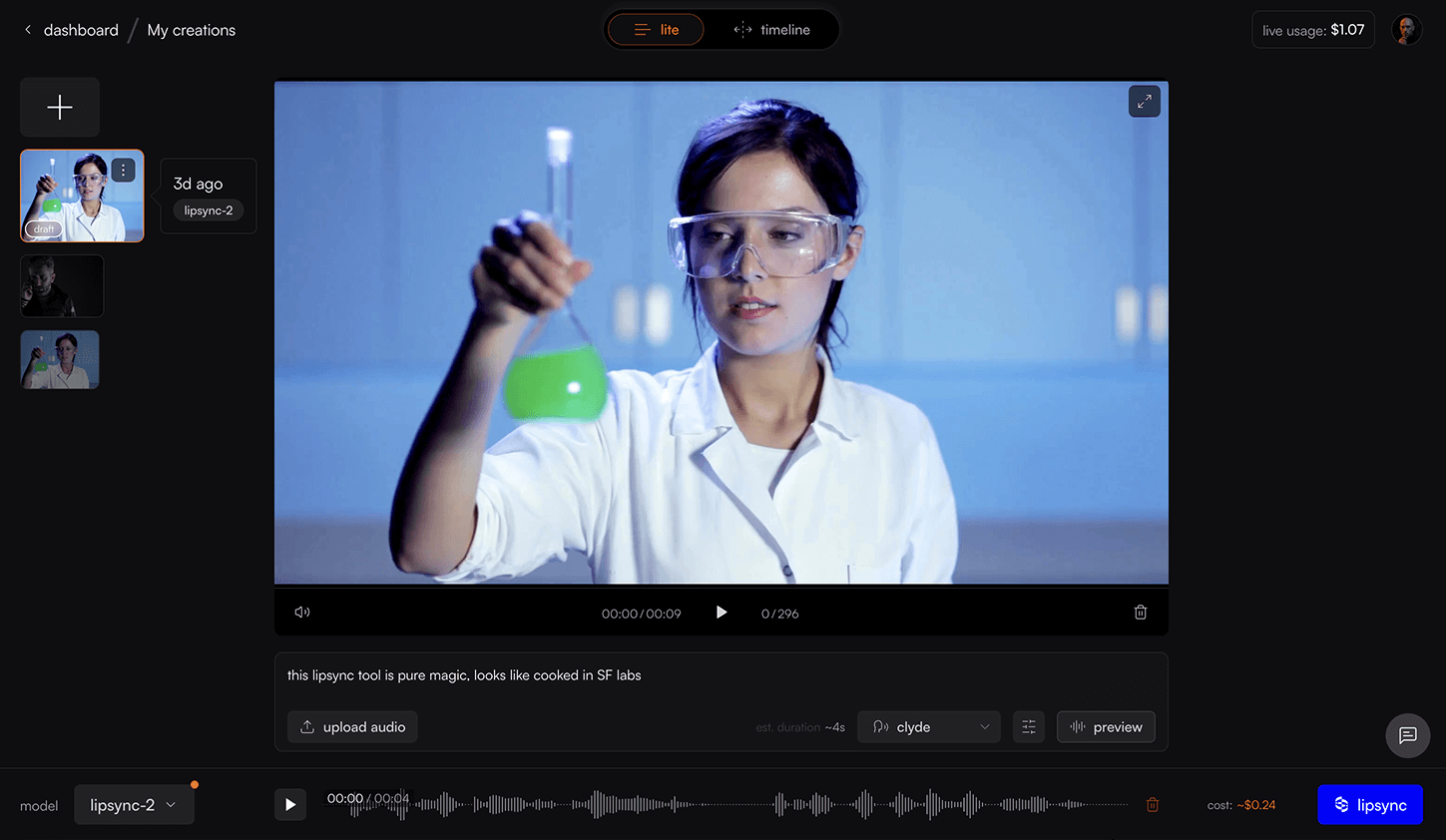
- More room for your video - Studio Lite now gives you more space to see your work with cleaner audio input controls for TTS, uploads, and URLs.
- Lipsync on the go - Complete mobile redesign with most features available in a cleaner, touch-optimized interface.
- Assets in Studio Lite - Access and manage your assets directly within Studio Lite for seamless project collaboration.
- Multiple segments support - Generate API now supports syncing different audio/TTS inputs to specific video segments, enabling precise control over multi-part lipsync projects with audio cropping capabilities. Learn more
Improvements
- TTS script now remembered when editing previous generations
- Improved timeline tracks virtualization with more lightweight implementation, making interactions 60fps smooth
- Faster media parsing in Studio Advanced and Lite, making the experience more seamless
- Improved voice selector UI for better user experience
- Model picker and lipsync button now update correctly when using TTS
- Support chat bubble repositioned to prevent overlap with interface elements
- Updated usage calculation to account for applied credits
- Clicking ‘New Generation’ in Studio Advanced now opens a new draft with the generation’s inputs already filled in
- Improved error toasts and documentation for unsupported media inputs
Bug fixes
- Fixed toggle for switching between source and lipsynced videos within Studio Advanced
- Fixed click interaction in after deleting drafts and generations
- Fixed the generation result not getting updated in Studio Advanced after completion
- Fixed drag-and-drop not working for assets in Studio Lite
Enhanced sharing and smarter limits
SharingPlayerUX
- Share with anyone, anywhere - Instantly share your lipsynced videos with friends and colleagues on X, Facebook, LinkedIn, or via email.
- Smart limit notifications - Get a clear UI feedback when approaching generation, concurrency, or free credit limits without losing your work.
- Bigger, better video player - Enjoy a larger, responsive player that adapts to your screen for the best viewing experience.
Improvements
- History panel now opens by default in Studio Pro for faster access
- Redesigned “Add Assets” button floats on the timeline for easier reach
- Full player controls now available in fullscreen mode
- Lipsync model selector now remembers your last choice
- Enhanced history thumbnails with clearer selected state for better visibility
Bug fixes
- Fixed organization creation flow preventing errors when navigating away
- Timeline controls no longer hidden after generating in Studio Pro
- Generation results now update immediately when completed
- Payment failure messages no longer block the video player
- Full-screen mode stays active when switching between views
- Segment markers now visible without hovering
Studio Lite and lipsync-2-pro
StudioUXModel
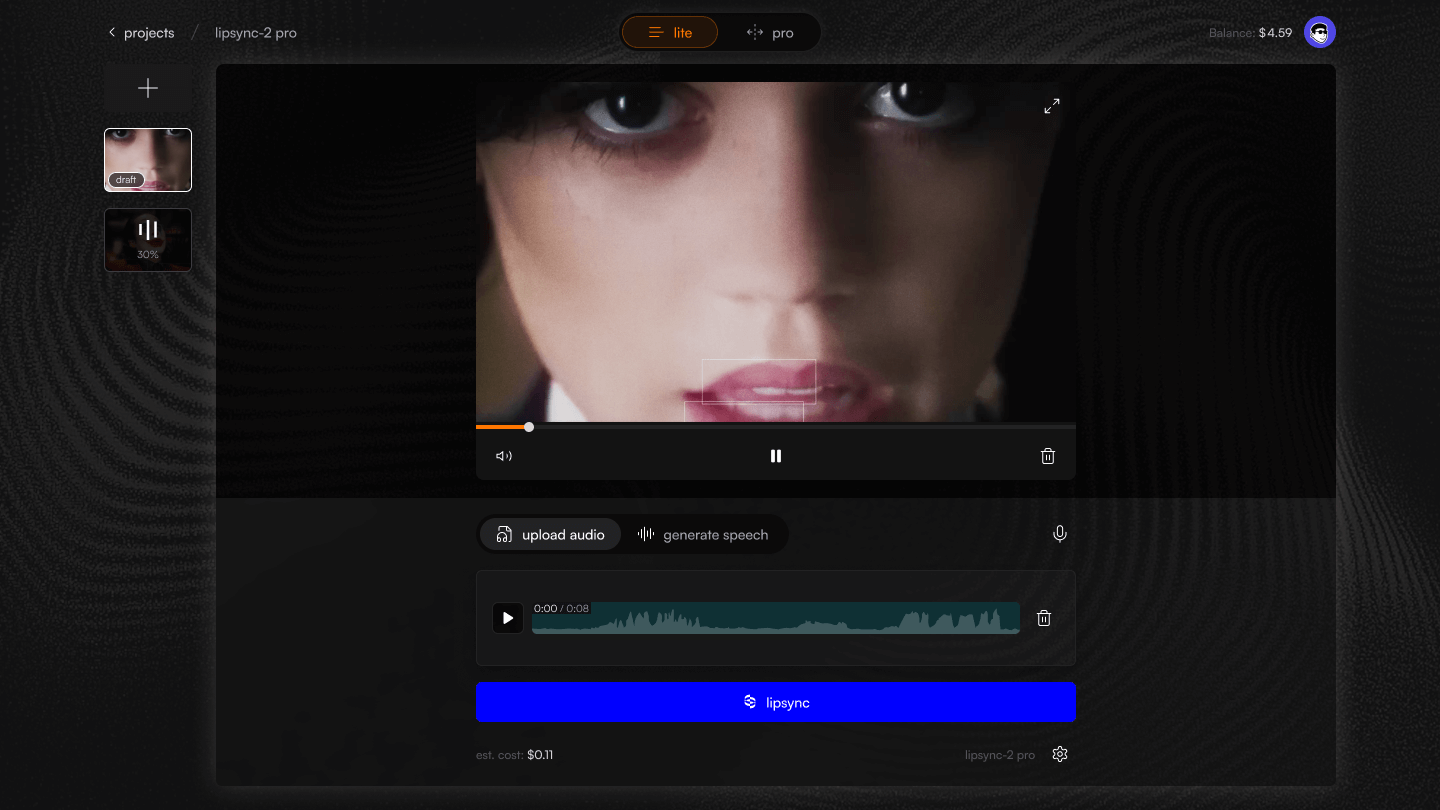
- Studio Lite - a new, simplified way to lipsync your videos. For more creative control, toggle switch to get into Pro mode.
- lipsync-2-pro - our latest studio-grade model with 4K support is now available to all paying users.
- New history - completely revamped History to find past generations easily.
- Draft edits - quickly edit multiple versions and iterate without re-uploading assets.
Improvements
- All new projects default to Studio Lite mode
- Audio state now remembered when switching between upload methods
- Clearer, more helpful error messages throughout the app
- Improved performance of loading custom voices
- Upgrade video player to support all major codecs
- Support messages connect directly to chat instead of email
- Better loading states - no more flashing screens
Bug fixes
- Fixed watermark not disappearing after upgrade
- Resolved video player sizing and playback issues in Safari
- Fixed video recording issues in Firefox and Safari
- Adding assets on mobile now added immediately to timeline
- Fixed deleted videos reappearing after upload
- Fixed keyboard issues for text-to-speech on mobile
- Session expiry redirects to login instead of showing errors
- Various bug fixes and improvements across the board